Term edits remote text files in place, up to a size cap. That number used to be a guess. Here is the measurement behind it.
Written
Why there is a cap
The SFTP browser can edit a remote text file without leaving the app: it downloads the file, opens it in the editor, and uploads it back over the original. The Edit row only appears for files under a size cap — and a cap is a promise. Everything under it opens and can be typed in.
Set it too low and you refuse files people could comfortably edit. Set it too high and you hand someone an editor that opens their file and then will not take their keystrokes, which is worse than not offering it at all.
Ours were 128 KB on the phone and 512 KB on the desktop, and both were picked by feel. Our own internal plan for replacing the editor quoted "degrades above 10 KB" — from the same source: nobody’s stopwatch. So we built a stopwatch into the app instead.
Frame gaps, not stopwatches
The expensive part of editing a large document is not our code. ArkUI’s text field lays out the whole document, and hands the whole document back to JavaScript as a fresh string on every keystroke. Neither shows up in a timer wrapped around our own functions, because both happen on the UI thread after our callback has returned. And what you actually feel is exactly that: the thread is busy, and the app does not move.
The instrument
So the instrument is the UI thread’s own heartbeat. The system can call you back at the start of the next frame; re-registering from inside that callback samples every frame. A frame that should arrive 16.7 ms after the last one and arrives 900 ms later means the thread was gone for 900 ms — that gap is the freeze, in the same units you feel it in, and it needs no cooperation from the component being measured. The floor is one frame: a "17 ms" in the table means the operation cost nothing measurable.
The document, and the keystroke
The test files are shaped like the ones this cap actually governs — configs, logs, scripts pulled over SFTP: mixed line lengths averaging about 52 columns, indentation, and a scattering of long lines. They are generated from a fixed seed, so two runs compare the same file.
Keystrokes are inserted in the middle of the document rather than appended. An append can be handled by an engine that only re-lays-out the tail; editing a config file is not an append.
The cost of a file, by size
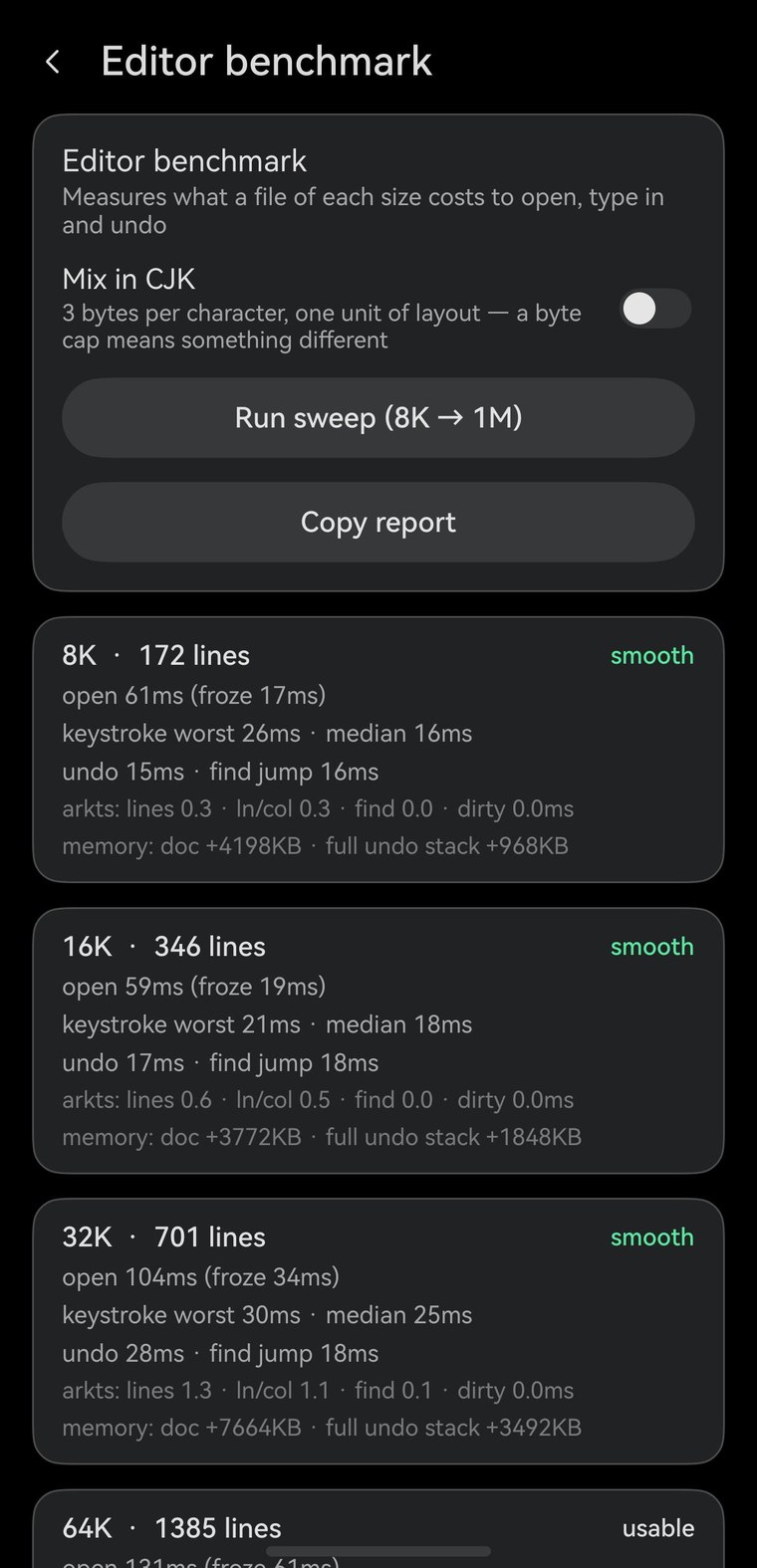
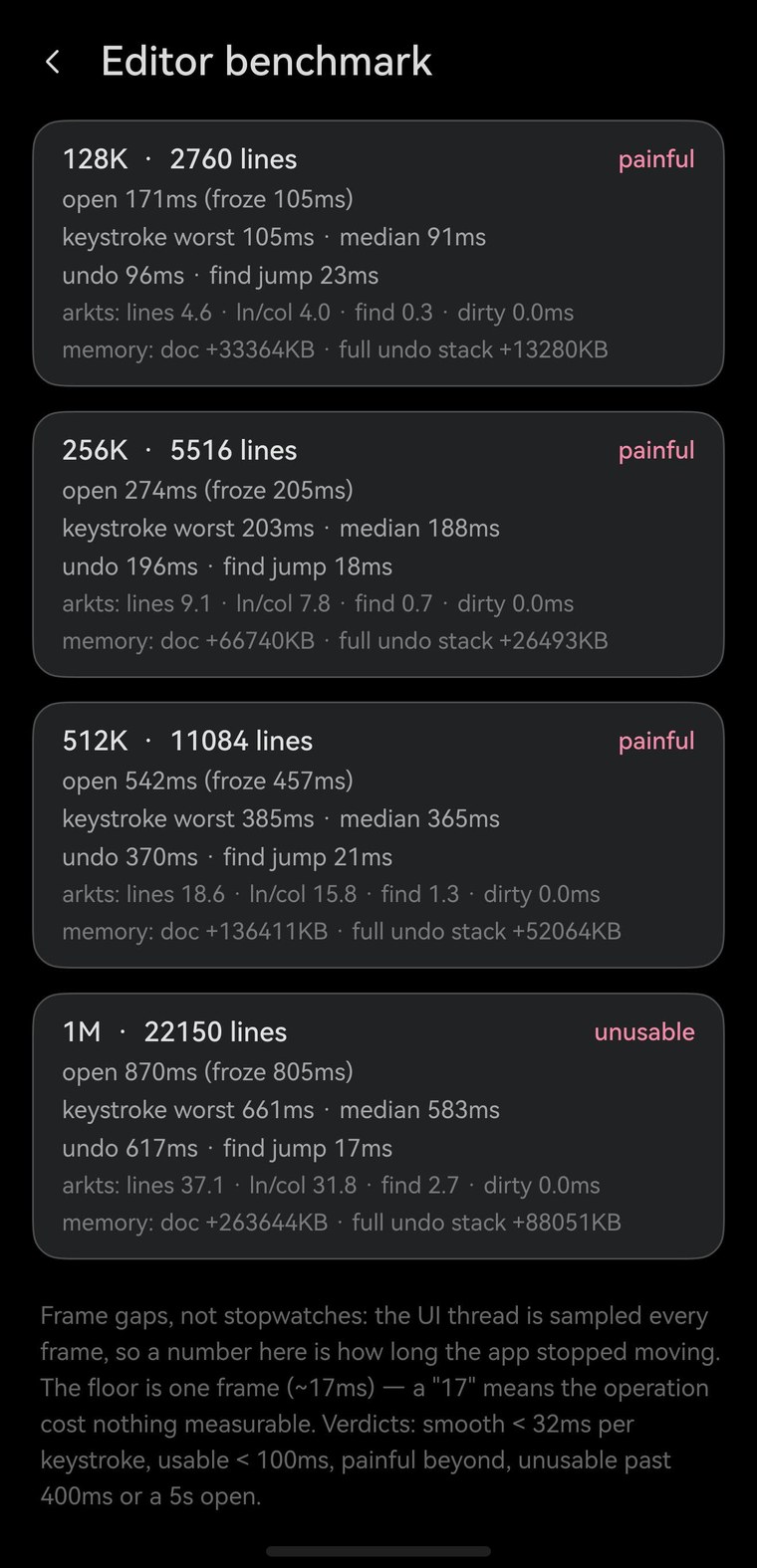
One run, on the phone emulator. Open is the longest freeze while the file opens, keystroke the median frame gap caused by typing one character in the middle of it, worst frame the slowest single one of those, and memory what the laid-out document adds to the process.
File
Lines
Open
Keystroke
Worst frame
Memory
8 KB
172
17 ms
16 ms
26 ms
4 MB
smooth
16 KB
346
19 ms
18 ms
21 ms
4 MB
smooth
32 KB
701
34 ms
25 ms
30 ms
7 MB
smooth
64 KB
1,385
61 ms
48 ms
50 ms
16 MB
usable
128 KB
2,760
105 ms
91 ms
105 ms
33 MB
at the limit
256 KB
5,516
205 ms
188 ms
203 ms
65 MB
painful
512 KB
11,084
457 ms
365 ms
385 ms
133 MB
painful
1 MB
22,150
805 ms
583 ms
661 ms
258 MB
unusable
The shape is a straight line: about 0.55 ms of typing latency per kilobyte, on top of a one-frame floor. Roughly a tenth of that is ours — counting lines and working out Ln/Col over the buffer — and the rest belongs to the platform’s text engine, which is why this number moves when the editor’s engine changes and not when its ArkTS is tuned.
Two things are free at every size: find, and jumping to a match. Scrolling to a hit a megabyte away cost one frame, the same as it did at 8 KB.
Up to 32 KB — where nearly every config file lives — a keystroke costs 25 ms or less and the editor keeps up with typing.From 128 KB up. At 512 KB a keystroke costs a third of a second; at 1 MB the file alone occupies 258 MB of memory.
What we changed
Two caps, one measurement, and one thing that turned out not to need a rule of its own.
Phone: 128 KB stays — now for a reason
It is the last size that still works, not a comfortable one. A keystroke there costs about a tenth of a second, and across runs 128 KB lands on either side of our "usable" line. Below 32 KB the editor is genuinely smooth, and that covers nearly everything anyone edits over SFTP.
Desktop: 512 KB → 128 KB
The old number assumed a desktop has room for more. It does not: the cost is the text layout, not the machine, and the 2-in-1 measured within a few percent of the phone. At 512 KB a keystroke there costs 0.36 s — that is not a large file opening slowly, it is an editor that cannot be typed in, offered by a cap that promised it would work.
Chinese files need no separate rule
A cap stated in bytes is a different promise for Chinese text, where a character is three bytes instead of one — so we measured that too. At the same byte size the cost came out within a few percent of the ASCII run: there are fewer characters per kilobyte, and the extra shaping work cancels the difference out. Memory runs about 20% higher. One cap, in bytes, is honest for both.
Two things to be honest about
These numbers come from emulators, not from a phone in a pocket. The table is the DevEco phone image (Pura 90) and the desktop cross-check is the 2-in-1 image (MateBook Pro), both running on an Apple Silicon Mac. A physical device brings its own CPU, memory bandwidth and thermal behaviour, and the honest thing to say is that we have not measured one. That is also why the benchmark ships inside the app’s developer settings rather than living on a laptop: it is one tap on whatever device you are holding, and it prints this same table.
And this is a baseline. Today’s editor is a platform text field, and about 90% of what the table measures is that widget. A native editor with a rope buffer and viewport-only layout should not produce a straight line here at all — the cost should stop tracking the size of the file. When we make that swap, this page is the "before".